

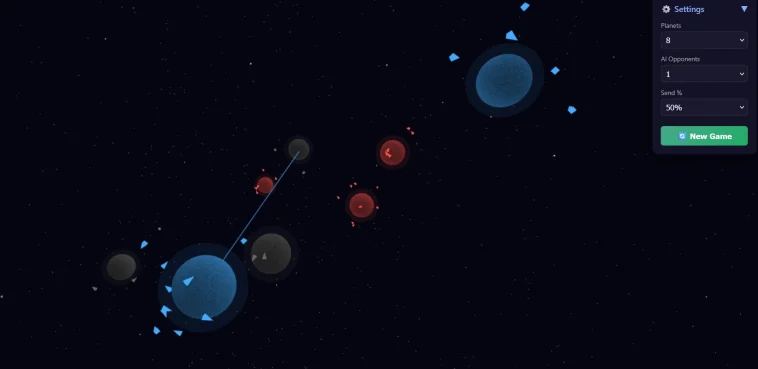
Building your own game (Play Here) sounds complicated but it’s not.
This project is a masterclass in what “vibe coding” can produce when paired with real technical skill.
Try It Yourself
This game runs directly in your browser, no installs, no setup. Just jump in and start playing.
Drag from your blue planets to send fleets across space. Take control of neutral gray worlds before the AI reaches them. As your ships travel, you’ll even see tiny laser flashes when they clash with enemy units mid-flight.
The controls are simple and intuitive:
- Drag from your planet → Send ships to attack
- Drag empty space → Rotate the camera
- Scroll → Zoom in or out
- Click any planet → Focus the camera on it
Once you start playing, it all feels natural within seconds.
If you know basic HTML and JavaScript, you can create something powerful like this 3D space strategy game
Let’s break it down in a way anyone can understand.
1. What You Actually Need (No BS)
You don’t need a game engine like Unity.
You only need:
- HTML → structure
- CSS → styling
- JavaScript → logic
- A library → we use Three.js (for 3D graphics)
That’s it.
2. Basic Structure of the Game
Every HTML game has this structure:
<!DOCTYPE html>
<html>
<head>
  <style>
    /* Styling */
  </style>
</head>
<body>

<div id="game"></div>

<script>
  // Game logic
</script>

</body>
</html>
In your code:
#game→ where the game renders- Script → controls everything
3. Rendering the Game (The Core Engine)
The most important part:
scene = new THREE.Scene();
camera = new THREE.PerspectiveCamera(60, innerWidth/innerHeight, 1, 2000);

renderer = new THREE.WebGLRenderer({ antialias: true });
renderer.setSize(innerWidth, innerHeight);

document.getElementById('game').appendChild(renderer.domElement);
What this does:
scene→ your game worldcamera→ what player seesrenderer→ draws everything on screen
Without this, nothing appears.
4. Creating Game Objects (Planets)
This is where your game becomes interesting.
const geo = new THREE.SphereGeometry(r, 48, 48);
const mesh = new THREE.Mesh(geo, material);
scene.add(mesh);
Simple explanation:
- Geometry → shape (sphere = planet)
- Material → color/style
- Mesh → actual object
You’re literally placing planets in space.
Game Logic (Movement & Interaction)
This is where most beginners fail.
Example:
function sendBoids(from, to, pct){
  const count = Math.floor(from.boids.length * pct);

  for(let i = 0; i < count; i++){
    const b = from.boids.pop();
    b.target = to;
    b.traveling = true;
  }
}
What’s happening:
- You select a planet
- Drag to another planet
- Units move → attack or capture
This is your core gameplay mechanic
6. Mouse + Touch Controls (Critical for Mobile)
Your game supports both desktop and mobile:
canvas.addEventListener('mousedown', ...)
canvas.addEventListener('touchstart', ...)
Why this matters:
- Desktop = mouse
- Mobile = touch
- Without this → game becomes unusable
You handled this correctly (most people don’t).
7. Game Loop (The Heartbeat)
function animate(){
  requestAnimationFrame(animate);

  updateBoids();
  updatePlanets();
  renderer.render(scene, camera);
}
This runs:
- 60 times per second
- Updates everything
- Keeps the game alive
This is your engine loop
8. AI System (Why Your Game Feels Alive)
function aiTurn(ai){
  const myPlanets = planets.filter(p => p.owner === ai);

  if(myPlanets.length === 0) return;

  const src = myPlanets[Math.random() * myPlanets.length];
  const targets = planets.filter(p => p.owner !== ai);

  sendBoids(src, targets[0], 0.55);
}
What it does:
- AI chooses planet
- Finds target
- Attacks
Simple logic → but feels intelligent
9. Effects (Why Your Game Looks Premium)
Your code uses:
- Shaders (planet effects)
- Glow effects
- Laser animations
Example:
fireLaser(from, to, color);This is what separates a basic game from a “wow” game
Check out the full source on CodePen: https://codepen.io/navdeep-patel/pen/gbwoqqL
10. Final Result
You now have:
- 3D environment
- Player vs AI
- Real-time gameplay
- Mobile + desktop support
And yes, you built this using just HTML + JS.
Final Reality Check
- Building the game is actually the easiest part
- Getting users is the hard part
If you:
Build + host + share
Then only could it be something valuable.
What’s the coolest single-file project you’ve come across? Drop it in the comments. I’m always looking for something impressive.
Don’t Miss:
Why Is There an Orange Smudge on My MacBook Pro Screen
Why Are There White Spots on Your iPad Screen?

